The problem
A personal injury case can arrive as a stack of PDFs, scanned records, voice notes, and client messages. Before a legal team can assess the case, someone has to extract the information, connect the documents, and work out what is missing.
SimplyLaw brings document processing, analysis, and communication into one workflow. A request and its supporting files provide shared context for agents with distinct responsibilities. The team can ask for a client update or a review of the case without rebuilding that context at each step.
My contribution
I developed the multi-agent workflow and AI Orchestrator, connecting intent classification, agent routing, and shared case context. I also worked on packaging and deploying the backend with Docker. My focus was the path from an incoming request to the agents that could handle it and the response the legal team would receive.
Architecture
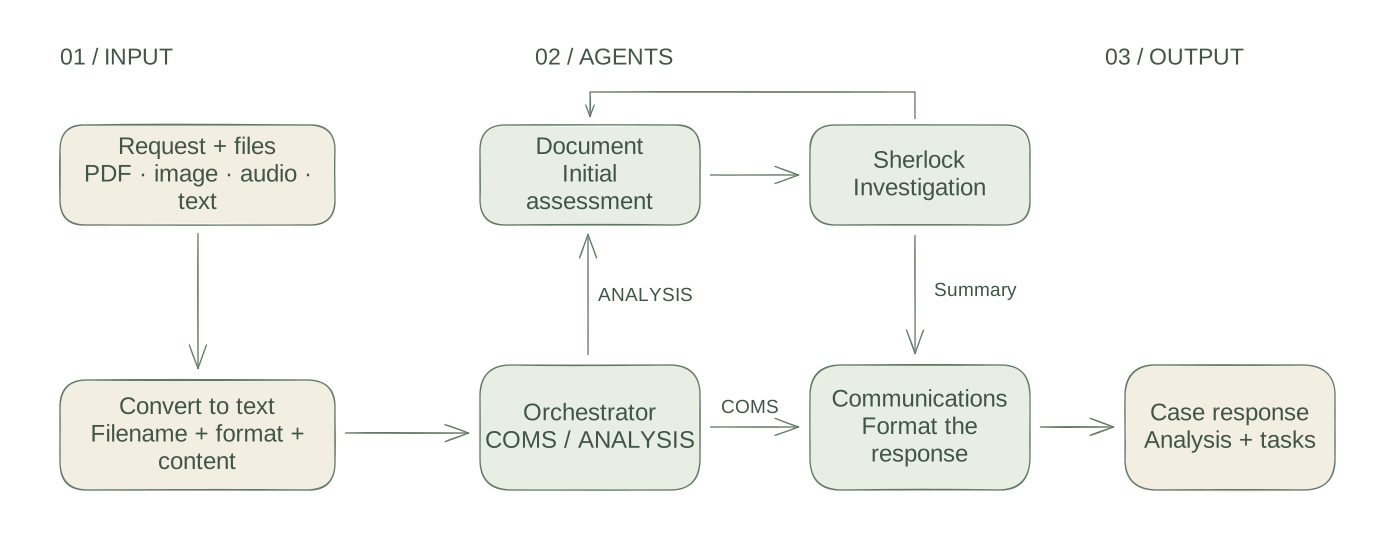
The request enters with a set of file references. Conversion produces text records that retain a filename and format. The orchestrator uses the request and a short preview of each file to select a workflow.
A communications request goes directly to the Communications agent with the document context. An analysis request starts with the Document agent, then alternates between Document and Sherlock. The orchestrator summarizes their conversation, generates follow-up tasks, and asks Communications to format a client-facing response.
| Agent | Responsibility |
|---|---|
| Orchestrator | Select the workflow, assemble context, and coordinate the response. |
| Document | Read the supplied material and develop an evidence-based assessment. |
| Sherlock | Investigate patterns, gaps, and alternative interpretations. |
| Communications | Turn the request or analysis into a clear draft for the client. |
Document processing
The conversion layer gives different input formats a common text representation. PDFs use PyPDF2 extraction. Images pass through grayscale conversion and Otsu thresholding before Tesseract OCR. Audio is decoded with pydub, exported to WAV, and transcribed through the speech-recognition library. Text files are read directly.
Each converter returns a record containing the extracted text and format-specific details. Failed conversions carry an error and a success flag. This keeps the extraction result available for inspection as files move through the workflow.
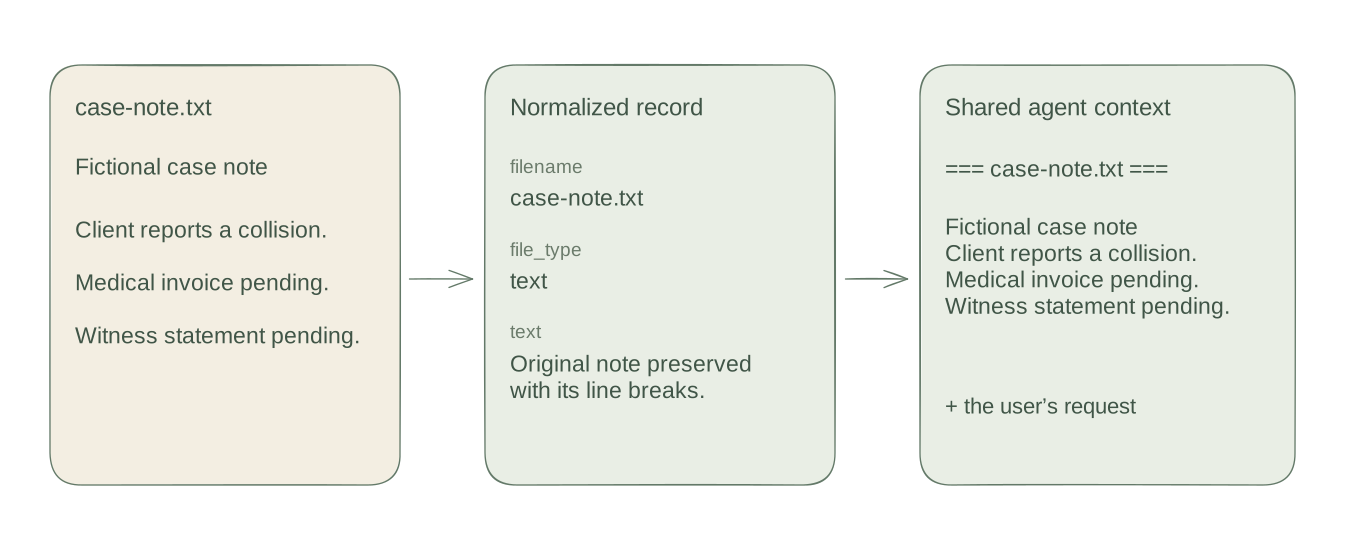
This example runs the source’s text converter on a fixed fictional note. The normalized record preserves the note’s contents and line breaks. The context builder then places the filename above the text, so each agent can see which document a passage came from.
The user’s request travels alongside this material. A request to prepare an update and a request to investigate missing evidence can therefore use the same documents while following different agent paths.
Agent collaboration
In this source revision, Gemini selects between COMS and ANALYSIS. The routing prompt includes the request and the first 200 characters of each converted file. An unrecognized response or a routing exception defaults to analysis.
async def determine_agent(self, user_request: str, file_contents: List[Dict[str, str]]):
    prompt = self._build_intent_prompt(user_request, file_contents)

    try:
        response = self.client.models.generate_content(
            model=self.model_id,
            contents=prompt
        )
        intent = response.text.strip().upper()

        if "COMS" in intent:
            return AgentType.COMS
        elif "ANALYSIS" in intent:
            return AgentType.ANALYSIS
        else:
            # Default to analysis if unclear
            return AgentType.ANALYSIS

    except Exception as e:
        print(f"Error determining intent: {e}")
        # Default to analysis
        return AgentType.ANALYSIS
Analysis begins with a Document assessment. Sherlock receives that assessment, the file context, and the conversation so far. Subsequent turns alternate between the two agents, building on the accumulated history. A shared conversation ID keeps those messages together.
The loop allows up to ten follow-up turns after the initial Document response. Once four messages exist, a substring check searches the latest three for words such as “agree” or “consensus.” A match ends the exchange; otherwise the loop continues to its limit. This rule provides a simple stopping condition for the orchestration.
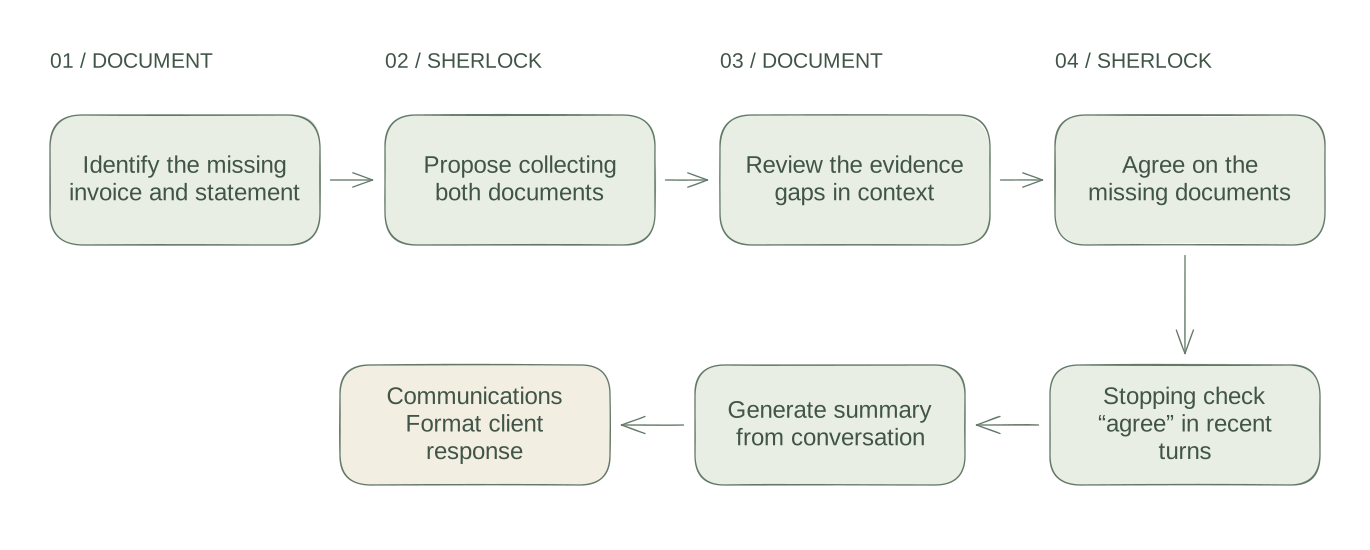
The figure uses scripted responses about a missing invoice and witness statement. The actual source code records the turns and detects the stopping keyword. Summary generation is stubbed for this offline example.
def _check_consensus(self, conversation_history: List[Dict[str, Any]]):
    if len(conversation_history) < 4:
        return False

    # Check last few messages for consensus keywords
    recent_messages = [msg['content'].lower() for msg in conversation_history[-3:]]
    consensus_keywords = [
        "agree", "consensus", "concluded", "final",
        "nothing new", "settled", "aligned"
    ]

    return any(
        keyword in message
        for message in recent_messages
        for keyword in consensus_keywords
    )
After the exchange, the orchestrator asks the model to summarize the conversation and propose actionable tasks. Communications receives that summary and the original request to produce a professional draft. The resulting record includes the selected workflow, response, and analysis for the interface to present.
Results
SimplyLaw won 1st Place in the Morgan & Morgan challenge at KnightHacks VIII. The project connected document intake, agent analysis, and client communication in a working legal case-management workflow.
For this case study, 12 offline checks exercise the pinned Python methods with fictional text and stubbed model responses. They verify text preservation, route selection, fallback behavior, alternating agent turns, and the stopping limit.
| Fixture | Observed behavior |
|---|---|
| Text intake | The normalized record retains the original note and filename. |
| Routing fallback | An unclear model reply or exception selects analysis. |
| Agreement example | The scripted exchange stops after four messages. |
| Iteration limit | The initial Document response is followed by at most ten additional turns. |
The opening animation illustrates these two routes using a fixed playback sequence. The demonstration below shows the project’s interface and workflow.